🍎 Available on the Mac App Store

Your collection,
finally organized.

Collectorly is a native Mac app for tracking video games, Funko Pops, trading cards, and every other collectible you own — with live market prices and optional iCloud sync.
Download on the Mac App Store
Explore features ↓
Collectorly main collection view
8
Item Categories
6
Condition Grades
2
Live Price Sources
iCloud Sync Built In

Everything a collector needs.

Built for Mac from the ground up. No Electron, no web wrappers — just a fast, native app that respects your privacy.

📷
Barcode Scanner
Point your Mac's camera at any UPC or EAN barcode. Collectorly identifies the item and fills in the name and price automatically — no typing required.
💰
Live Market Prices
Fetch current prices from PriceCharting or eBay's live marketplace. Prices automatically adjust based on the condition you set — Mint to Poor.
📊
Gain / Loss Tracking
Enter what you paid for each item and Collectorly calculates your gain or loss in real time. See your total portfolio value at a glance in the sidebar.
🎮
All Your Collectibles
Video games, consoles, Funko Pops, action figures, trading cards, books, and more. Eight built-in categories with dedicated fields for platform, series, and item number.
🖼️
Camera & Photo Import
Attach cover art from your file library or take a photo with your Mac's camera directly in the Add Item sheet. Photos sync to your private iCloud automatically.
☁️
iCloud Sync
Your collection syncs automatically to your private CloudKit database — the same iCloud account only you can access. When the iOS version of Collectorly arrives, your data will already be there.
🔍
Instant Search & Filter
Search across names, platforms, series, barcodes, and notes instantly. Filter by category, condition, or favorites. Sort by value, date, name, or condition.
Favorites & Organization
Mark your prized pieces as favorites for quick access. Switch between a visual grid and compact list view depending on how you like to browse.
⌨️
Full Keyboard Support
⌘N to add, ⌘, for settings, ⌘Return to save. Collectorly is a proper Mac app — everything works the way Mac apps should.

See it in action.

A dark, focused interface designed to keep your collection front and center.

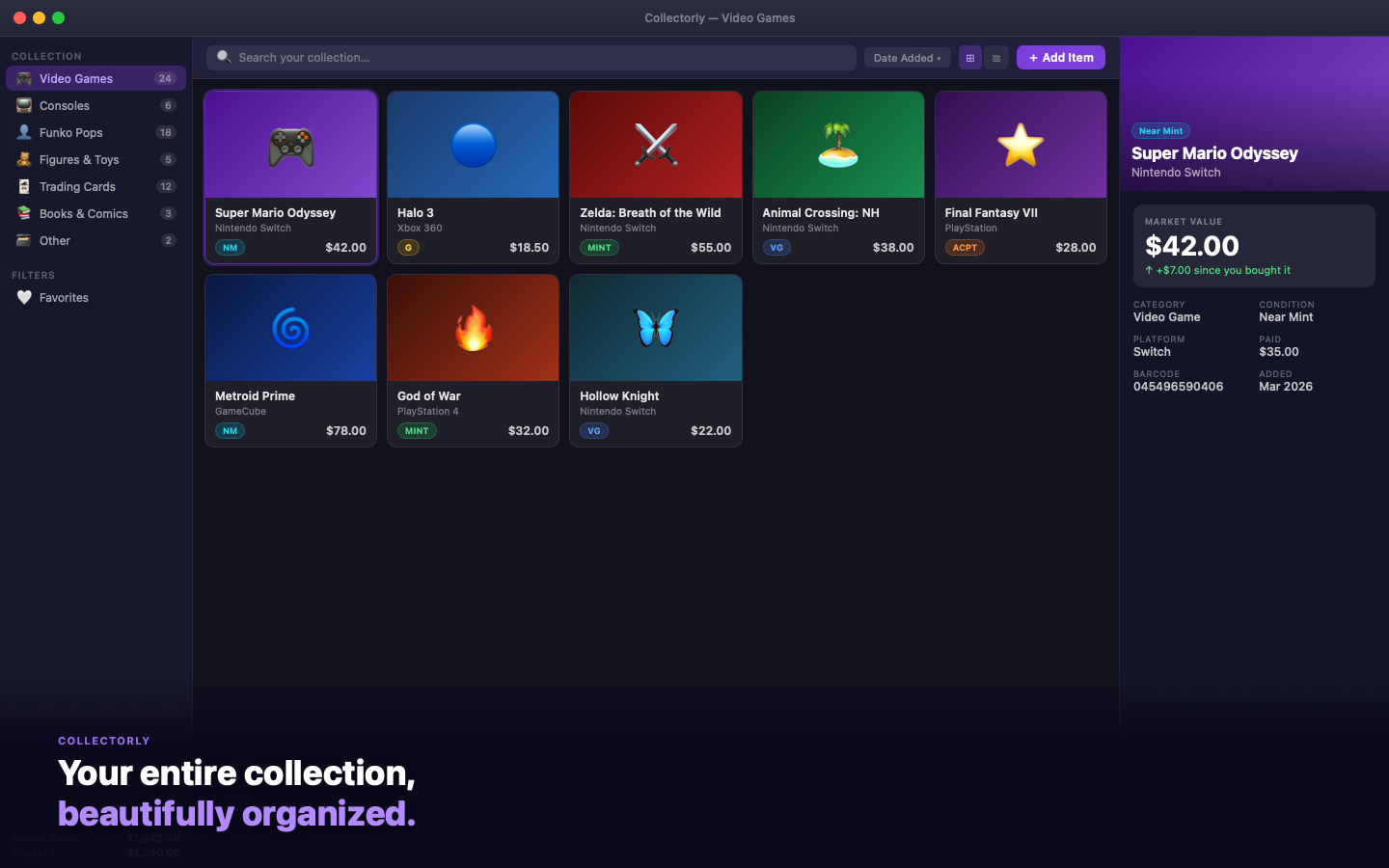
Collectorly screenshot

Browse your full collection in a visual grid with condition badges and live market prices.

How it works.

From unboxing to fully catalogued in minutes.

1
Add your first item
Click Add Item (or press ⌘N) to open the Add Item sheet. You can type the item name manually, or use the barcode scanner to identify it instantly. Fill in the category, condition, and any other details you want to track.
💡 The barcode scanner works with UPC-A, EAN-13, EAN-8, Code 128, Code 39, and QR codes.
2
Set the condition
Choose from six condition grades: Mint, Near Mint, Very Good, Good, Acceptable, and Poor. Each grade has a color-coded badge and affects the auto-fetched market price — so a Mint copy is priced differently from a Good copy of the same item.
3
Fetch the market price
In the Pricing tab of the Add Item sheet, click Fetch Price. Collectorly queries PriceCharting or eBay (your choice in Settings) and fills in the current market value based on the item name and condition. You can also enter a price manually or override the fetched value.
💡 To enable PriceCharting, get a free API token at pricecharting.com. For eBay, create a free developer account at developer.ebay.com.
4
Record what you paid
Enter your purchase price and date. Collectorly immediately shows you the gain or loss on the item detail page — and adds it to your portfolio total in the sidebar footer. Over time, you'll see exactly how your collection has performed.
5
Browse and search your collection
Use the sidebar to filter by category. Use the search bar to find any item by name, platform, series, barcode, or notes. Sort by value, condition, name, or date added. Toggle favorites to see your best pieces. Switch between grid and list view anytime.
6
Keep prices fresh
Open any item and click Refresh Price in the detail view to fetch the latest market value. Prices aren't updated automatically — you're in control of when lookups happen, so you never burn through API rate limits unexpectedly.
💡 UPC Item DB (barcode lookup) is free with no API key required — 100 lookups per day.
7
Sync across devices with iCloud
If you're signed into iCloud on your Mac, your collection automatically syncs to your private CloudKit database — accessible only by you. When the iOS version of Collectorly is released, your full collection will already be there. To disable sync, go to System Settings → Apple ID → iCloud → Collectorly and turn it off.
💡 iCloud sync is completely optional. The app works fully offline and stores everything locally regardless of iCloud status.
8
Export your data
Go to Collectorly → Settings → Stats & Data and click Export as CSV to save your entire collection to a spreadsheet-compatible file. Open it in Numbers, Excel, or Google Sheets. Your data is always portable.

Two ways to get prices.

Choose the source that fits your collection best, or switch between them anytime in Settings.

🛒
eBay Browse API
Live marketplace data for any collectible. Good for items not in the PriceCharting database.
  • Free developer account (developer.ebay.com)
  • Median price from active fixed-price listings
  • Covers virtually any item category
  • Price scaled by condition multiplier
UPC Item DB
Barcode-to-name lookup. Always active — no key needed.
  • No API key required
  • 100 free lookups per day
  • Identifies item name from barcode
  • Works alongside either price source

Your data, your control.

Collectorly stores your collection locally on your Mac and optionally syncs it to your private iCloud account — a space only you can access. No account. No analytics. The only network traffic is price and barcode lookups, and only when you ask.

  • Local data stored in ~/Library/Application Support/Collectorly/
  • iCloud sync goes to your private CloudKit database — not our servers
  • No account or login required beyond your existing Apple ID
  • No analytics, crash reporters, or third-party SDKs
  • Fully sandboxed Mac App Store build
  • Export and delete your data anytime
Read the full Privacy Policy →
Where Your Data Lives
LOCAL (ALWAYS)
~/Library/Application Support/
Collectorly/
iCLOUD (IF SIGNED IN)
Your private CloudKit database
iCloud.com.michaelmcgarry.Collectorly
API TOKENS
macOS UserDefaults (sandboxed)

Start cataloguing
your collection today.

Free to download. No account required. Your data stays with you.

Download on the Mac App Store

macOS 14.0 Sonoma or later required